# Usefull CMDs

# Linux

# Disk / Space CMD

## <span class="text-big">Disk / Space CMD</span>

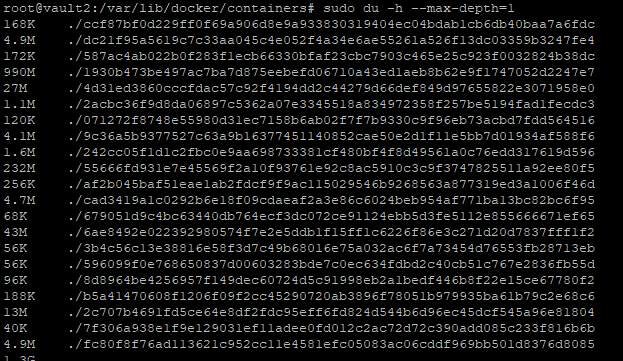
<span class="text-big">Will give the usage of the user you are logged in as</span>

```bash
sudo du -h --max-depth=1
```

[![image.png](https://bookstack.thecartwrights.nz/uploads/images/gallery/2024-03/scaled-1680-/image.png)](https://bookstack.thecartwrights.nz/uploads/images/gallery/2024-03/image.png)

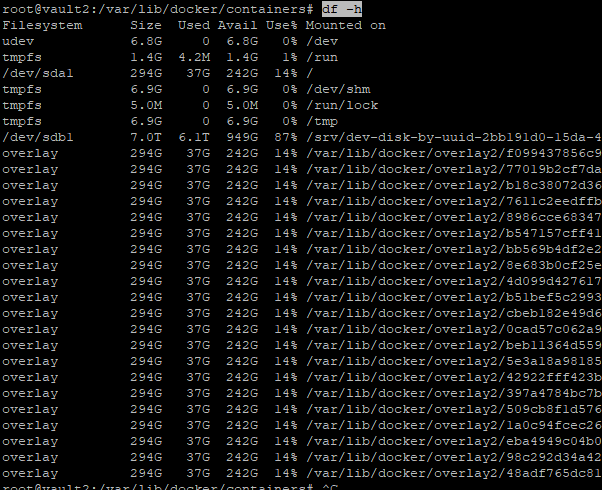
The `df` command primarily checks disk usage on a mounted filesystem. If you don't include a file name, the output shows the space available on all currently mounted filesystems. Disk space is shown in 1K blocks by default:

```bash
df -h
```

[![image.png](https://bookstack.thecartwrights.nz/uploads/images/gallery/2024-03/scaled-1680-/Kcmimage.png)](https://bookstack.thecartwrights.nz/uploads/images/gallery/2024-03/Kcmimage.png)
List All Block Devices in Linux

lsblk

```
lsblk
```

[![image.png](https://bookstack.thecartwrights.nz/uploads/images/gallery/2024-03/scaled-1680-/zVQimage.png)](https://bookstack.thecartwrights.nz/uploads/images/gallery/2024-03/zVQimage.png)

[![image.png](https://bookstack.thecartwrights.nz/uploads/images/gallery/2024-03/scaled-1680-/aXfimage.png)](https://bookstack.thecartwrights.nz/uploads/images/gallery/2024-03/aXfimage.png)
# Mount network share

```bash
sudo mount.cifs //192.168.1.252/5tb /5TB -o user=USER,pass=PASS
```

#### Install CIFS

```bash
sudo apt install cifs-utils 
```

---

```powershell
mount.cifs //192.168.1.251/hel /mnt/share/NAS/hydra -o user=USER,pass=PASS
```

# Vault 2 issues with Nginx Proxy not working

Check logs in Portainer - bind port already used (80)

```bash
 lsof -i tcp:80
```

This will show whats running on that port

```bash
fuser -k 80/tcp
```

This should kill the process, but if not do the below (based on the COMMAND Name)

```bash
systemctl stop haproxy
```

# 📂 Sharing a Folder on Debian Linux via Samba

**Last Updated:** 2025-06-01  
**Applies To:** Debian 10+, Ubuntu, other Debian-based distributions  
**Use Case:** Share a local folder over the network for access from Windows, macOS, or Linux machines.

---

### 🧰 Prerequisites

- Debian-based Linux system
- `sudo` privileges
- Network connectivity to target devices

---

### 🔧 Step 1: Install Samba

Update the system and install Samba:

<div class="contain-inline-size rounded-md border-[0.5px] border-token-border-medium relative bg-token-sidebar-surface-primary" id="bkmrk-bash-copyedit-sudo-a"><div class="flex items-center text-token-text-secondary px-4 py-2 text-xs font-sans justify-between h-9 bg-token-sidebar-surface-primary dark:bg-token-main-surface-secondary select-none rounded-t-[5px]">bash</div><div class="sticky top-9"><div class="absolute end-0 bottom-0 flex h-9 items-center pe-2"><div class="bg-token-sidebar-surface-primary text-token-text-secondary dark:bg-token-main-surface-secondary flex items-center rounded-sm px-2 font-sans text-xs"><button aria-label="Copy" class="flex gap-1 items-center select-none px-4 py-1"><svg class="icon-xs" fill="none" height="24" viewbox="0 0 24 24" width="24" xmlns="http://www.w3.org/2000/svg"><path clip-rule="evenodd" d="M7 5C7 3.34315 8.34315 2 10 2H19C20.6569 2 22 3.34315 22 5V14C22 15.6569 20.6569 17 19 17H17V19C17 20.6569 15.6569 22 14 22H5C3.34315 22 2 20.6569 2 19V10C2 8.34315 3.34315 7 5 7H7V5ZM9 7H14C15.6569 7 17 8.34315 17 10V15H19C19.5523 15 20 14.5523 20 14V5C20 4.44772 19.5523 4 19 4H10C9.44772 4 9 4.44772 9 5V7ZM5 9C4.44772 9 4 9.44772 4 10V19C4 19.5523 4.44772 20 5 20H14C14.5523 20 15 19.5523 15 19V10C15 9.44772 14.5523 9 14 9H5Z" fill="currentColor" fill-rule="evenodd"></path></svg>Copy</button><span class="" data-state="closed"><button class="flex items-center gap-1 px-4 py-1 select-none"><svg class="icon-xs" fill="none" height="24" viewbox="0 0 24 24" width="24" xmlns="http://www.w3.org/2000/svg"><path d="M2.5 5.5C4.3 5.2 5.2 4 5.5 2.5C5.8 4 6.7 5.2 8.5 5.5C6.7 5.8 5.8 7 5.5 8.5C5.2 7 4.3 5.8 2.5 5.5Z" fill="currentColor" stroke="currentColor" stroke-linecap="round" stroke-linejoin="round"></path><path d="M5.66282 16.5231L5.18413 19.3952C5.12203 19.7678 5.09098 19.9541 5.14876 20.0888C5.19933 20.2067 5.29328 20.3007 5.41118 20.3512C5.54589 20.409 5.73218 20.378 6.10476 20.3159L8.97693 19.8372C9.72813 19.712 10.1037 19.6494 10.4542 19.521C10.7652 19.407 11.0608 19.2549 11.3343 19.068C11.6425 18.8575 11.9118 18.5882 12.4503 18.0497L20 10.5C21.3807 9.11929 21.3807 6.88071 20 5.5C18.6193 4.11929 16.3807 4.11929 15 5.5L7.45026 13.0497C6.91175 13.5882 6.6425 13.8575 6.43197 14.1657C6.24513 14.4392 6.09299 14.7348 5.97903 15.0458C5.85062 15.3963 5.78802 15.7719 5.66282 16.5231Z" stroke="currentColor" stroke-linecap="round" stroke-linejoin="round" stroke-width="2"></path><path d="M14.5 7L18.5 11" stroke="currentColor" stroke-linecap="round" stroke-linejoin="round" stroke-width="2"></path></svg>Edit</button></span></div></div></div><div class="overflow-y-auto p-4" dir="ltr">`sudo apt updatesudo apt install samba`</div></div>---

### 📁 Step 2: Create a Shared Directory

Choose or create the folder to share. Example:

<div class="contain-inline-size rounded-md border-[0.5px] border-token-border-medium relative bg-token-sidebar-surface-primary" id="bkmrk-bash-copyedit-sudo-m"><div class="flex items-center text-token-text-secondary px-4 py-2 text-xs font-sans justify-between h-9 bg-token-sidebar-surface-primary dark:bg-token-main-surface-secondary select-none rounded-t-[5px]">bash</div><div class="sticky top-9"><div class="absolute end-0 bottom-0 flex h-9 items-center pe-2"><div class="bg-token-sidebar-surface-primary text-token-text-secondary dark:bg-token-main-surface-secondary flex items-center rounded-sm px-2 font-sans text-xs"><button aria-label="Copy" class="flex gap-1 items-center select-none px-4 py-1"><svg class="icon-xs" fill="none" height="24" viewbox="0 0 24 24" width="24" xmlns="http://www.w3.org/2000/svg"><path clip-rule="evenodd" d="M7 5C7 3.34315 8.34315 2 10 2H19C20.6569 2 22 3.34315 22 5V14C22 15.6569 20.6569 17 19 17H17V19C17 20.6569 15.6569 22 14 22H5C3.34315 22 2 20.6569 2 19V10C2 8.34315 3.34315 7 5 7H7V5ZM9 7H14C15.6569 7 17 8.34315 17 10V15H19C19.5523 15 20 14.5523 20 14V5C20 4.44772 19.5523 4 19 4H10C9.44772 4 9 4.44772 9 5V7ZM5 9C4.44772 9 4 9.44772 4 10V19C4 19.5523 4.44772 20 5 20H14C14.5523 20 15 19.5523 15 19V10C15 9.44772 14.5523 9 14 9H5Z" fill="currentColor" fill-rule="evenodd"></path></svg>Copy</button><span class="" data-state="closed"><button class="flex items-center gap-1 px-4 py-1 select-none"><svg class="icon-xs" fill="none" height="24" viewbox="0 0 24 24" width="24" xmlns="http://www.w3.org/2000/svg"><path d="M2.5 5.5C4.3 5.2 5.2 4 5.5 2.5C5.8 4 6.7 5.2 8.5 5.5C6.7 5.8 5.8 7 5.5 8.5C5.2 7 4.3 5.8 2.5 5.5Z" fill="currentColor" stroke="currentColor" stroke-linecap="round" stroke-linejoin="round"></path><path d="M5.66282 16.5231L5.18413 19.3952C5.12203 19.7678 5.09098 19.9541 5.14876 20.0888C5.19933 20.2067 5.29328 20.3007 5.41118 20.3512C5.54589 20.409 5.73218 20.378 6.10476 20.3159L8.97693 19.8372C9.72813 19.712 10.1037 19.6494 10.4542 19.521C10.7652 19.407 11.0608 19.2549 11.3343 19.068C11.6425 18.8575 11.9118 18.5882 12.4503 18.0497L20 10.5C21.3807 9.11929 21.3807 6.88071 20 5.5C18.6193 4.11929 16.3807 4.11929 15 5.5L7.45026 13.0497C6.91175 13.5882 6.6425 13.8575 6.43197 14.1657C6.24513 14.4392 6.09299 14.7348 5.97903 15.0458C5.85062 15.3963 5.78802 15.7719 5.66282 16.5231Z" stroke="currentColor" stroke-linecap="round" stroke-linejoin="round" stroke-width="2"></path><path d="M14.5 7L18.5 11" stroke="currentColor" stroke-linecap="round" stroke-linejoin="round" stroke-width="2"></path></svg>Edit</button></span></div></div></div><div class="overflow-y-auto p-4" dir="ltr">`sudo <span class="hljs-built_in">mkdir</span> -p /srv/sharesudo <span class="hljs-built_in">chown</span> nobody:nogroup /srv/sharesudo <span class="hljs-built_in">chmod</span> 0775 /srv/share`</div></div>This creates a public share folder with loose permissions (for anonymous access).

---

### 🛠️ Step 3: Configure Samba

Edit the Samba configuration file:

<div class="contain-inline-size rounded-md border-[0.5px] border-token-border-medium relative bg-token-sidebar-surface-primary" id="bkmrk-bash-copyedit-sudo-n"><div class="flex items-center text-token-text-secondary px-4 py-2 text-xs font-sans justify-between h-9 bg-token-sidebar-surface-primary dark:bg-token-main-surface-secondary select-none rounded-t-[5px]">bash</div><div class="sticky top-9"><div class="absolute end-0 bottom-0 flex h-9 items-center pe-2"><div class="bg-token-sidebar-surface-primary text-token-text-secondary dark:bg-token-main-surface-secondary flex items-center rounded-sm px-2 font-sans text-xs"><button aria-label="Copy" class="flex gap-1 items-center select-none px-4 py-1"><svg class="icon-xs" fill="none" height="24" viewbox="0 0 24 24" width="24" xmlns="http://www.w3.org/2000/svg"><path clip-rule="evenodd" d="M7 5C7 3.34315 8.34315 2 10 2H19C20.6569 2 22 3.34315 22 5V14C22 15.6569 20.6569 17 19 17H17V19C17 20.6569 15.6569 22 14 22H5C3.34315 22 2 20.6569 2 19V10C2 8.34315 3.34315 7 5 7H7V5ZM9 7H14C15.6569 7 17 8.34315 17 10V15H19C19.5523 15 20 14.5523 20 14V5C20 4.44772 19.5523 4 19 4H10C9.44772 4 9 4.44772 9 5V7ZM5 9C4.44772 9 4 9.44772 4 10V19C4 19.5523 4.44772 20 5 20H14C14.5523 20 15 19.5523 15 19V10C15 9.44772 14.5523 9 14 9H5Z" fill="currentColor" fill-rule="evenodd"></path></svg>Copy</button><span class="" data-state="closed"><button class="flex items-center gap-1 px-4 py-1 select-none"><svg class="icon-xs" fill="none" height="24" viewbox="0 0 24 24" width="24" xmlns="http://www.w3.org/2000/svg"><path d="M2.5 5.5C4.3 5.2 5.2 4 5.5 2.5C5.8 4 6.7 5.2 8.5 5.5C6.7 5.8 5.8 7 5.5 8.5C5.2 7 4.3 5.8 2.5 5.5Z" fill="currentColor" stroke="currentColor" stroke-linecap="round" stroke-linejoin="round"></path><path d="M5.66282 16.5231L5.18413 19.3952C5.12203 19.7678 5.09098 19.9541 5.14876 20.0888C5.19933 20.2067 5.29328 20.3007 5.41118 20.3512C5.54589 20.409 5.73218 20.378 6.10476 20.3159L8.97693 19.8372C9.72813 19.712 10.1037 19.6494 10.4542 19.521C10.7652 19.407 11.0608 19.2549 11.3343 19.068C11.6425 18.8575 11.9118 18.5882 12.4503 18.0497L20 10.5C21.3807 9.11929 21.3807 6.88071 20 5.5C18.6193 4.11929 16.3807 4.11929 15 5.5L7.45026 13.0497C6.91175 13.5882 6.6425 13.8575 6.43197 14.1657C6.24513 14.4392 6.09299 14.7348 5.97903 15.0458C5.85062 15.3963 5.78802 15.7719 5.66282 16.5231Z" stroke="currentColor" stroke-linecap="round" stroke-linejoin="round" stroke-width="2"></path><path d="M14.5 7L18.5 11" stroke="currentColor" stroke-linecap="round" stroke-linejoin="round" stroke-width="2"></path></svg>Edit</button></span></div></div></div><div class="overflow-y-auto p-4" dir="ltr">`sudo nano /etc/samba/smb.conf`</div></div>Add the following to the bottom of the file:

<div class="contain-inline-size rounded-md border-[0.5px] border-token-border-medium relative bg-token-sidebar-surface-primary" id="bkmrk-ini-copyedit-%5Bpublic"><div class="flex items-center text-token-text-secondary px-4 py-2 text-xs font-sans justify-between h-9 bg-token-sidebar-surface-primary dark:bg-token-main-surface-secondary select-none rounded-t-[5px]">ini</div><div class="sticky top-9"><div class="absolute end-0 bottom-0 flex h-9 items-center pe-2"><div class="bg-token-sidebar-surface-primary text-token-text-secondary dark:bg-token-main-surface-secondary flex items-center rounded-sm px-2 font-sans text-xs"><button aria-label="Copy" class="flex gap-1 items-center select-none px-4 py-1"><svg class="icon-xs" fill="none" height="24" viewbox="0 0 24 24" width="24" xmlns="http://www.w3.org/2000/svg"><path clip-rule="evenodd" d="M7 5C7 3.34315 8.34315 2 10 2H19C20.6569 2 22 3.34315 22 5V14C22 15.6569 20.6569 17 19 17H17V19C17 20.6569 15.6569 22 14 22H5C3.34315 22 2 20.6569 2 19V10C2 8.34315 3.34315 7 5 7H7V5ZM9 7H14C15.6569 7 17 8.34315 17 10V15H19C19.5523 15 20 14.5523 20 14V5C20 4.44772 19.5523 4 19 4H10C9.44772 4 9 4.44772 9 5V7ZM5 9C4.44772 9 4 9.44772 4 10V19C4 19.5523 4.44772 20 5 20H14C14.5523 20 15 19.5523 15 19V10C15 9.44772 14.5523 9 14 9H5Z" fill="currentColor" fill-rule="evenodd"></path></svg>Copy</button><span class="" data-state="closed"><button class="flex items-center gap-1 px-4 py-1 select-none"><svg class="icon-xs" fill="none" height="24" viewbox="0 0 24 24" width="24" xmlns="http://www.w3.org/2000/svg"><path d="M2.5 5.5C4.3 5.2 5.2 4 5.5 2.5C5.8 4 6.7 5.2 8.5 5.5C6.7 5.8 5.8 7 5.5 8.5C5.2 7 4.3 5.8 2.5 5.5Z" fill="currentColor" stroke="currentColor" stroke-linecap="round" stroke-linejoin="round"></path><path d="M5.66282 16.5231L5.18413 19.3952C5.12203 19.7678 5.09098 19.9541 5.14876 20.0888C5.19933 20.2067 5.29328 20.3007 5.41118 20.3512C5.54589 20.409 5.73218 20.378 6.10476 20.3159L8.97693 19.8372C9.72813 19.712 10.1037 19.6494 10.4542 19.521C10.7652 19.407 11.0608 19.2549 11.3343 19.068C11.6425 18.8575 11.9118 18.5882 12.4503 18.0497L20 10.5C21.3807 9.11929 21.3807 6.88071 20 5.5C18.6193 4.11929 16.3807 4.11929 15 5.5L7.45026 13.0497C6.91175 13.5882 6.6425 13.8575 6.43197 14.1657C6.24513 14.4392 6.09299 14.7348 5.97903 15.0458C5.85062 15.3963 5.78802 15.7719 5.66282 16.5231Z" stroke="currentColor" stroke-linecap="round" stroke-linejoin="round" stroke-width="2"></path><path d="M14.5 7L18.5 11" stroke="currentColor" stroke-linecap="round" stroke-linejoin="round" stroke-width="2"></path></svg>Edit</button></span></div></div></div><div class="overflow-y-auto p-4" dir="ltr">`<span class="hljs-section">[PublicShare]</span>   <span class="hljs-attr">path</span> = /srv/share   <span class="hljs-attr">browseable</span> = <span class="hljs-literal">yes</span>   read <span class="hljs-attr">only</span> = <span class="hljs-literal">no</span>   guest <span class="hljs-attr">ok</span> = <span class="hljs-literal">yes</span>   force <span class="hljs-attr">user</span> = nobody`</div></div>> 📌 *Tip:* `force user = nobody` ensures files are written as the `nobody` user, preventing permission issues.

---

### 🔄 Step 4: Restart Samba Services

<div class="contain-inline-size rounded-md border-[0.5px] border-token-border-medium relative bg-token-sidebar-surface-primary" id="bkmrk-bash-copyedit-sudo-s"><div class="flex items-center text-token-text-secondary px-4 py-2 text-xs font-sans justify-between h-9 bg-token-sidebar-surface-primary dark:bg-token-main-surface-secondary select-none rounded-t-[5px]">bash</div><div class="sticky top-9"><div class="absolute end-0 bottom-0 flex h-9 items-center pe-2"><div class="bg-token-sidebar-surface-primary text-token-text-secondary dark:bg-token-main-surface-secondary flex items-center rounded-sm px-2 font-sans text-xs"><button aria-label="Copy" class="flex gap-1 items-center select-none px-4 py-1"><svg class="icon-xs" fill="none" height="24" viewbox="0 0 24 24" width="24" xmlns="http://www.w3.org/2000/svg"><path clip-rule="evenodd" d="M7 5C7 3.34315 8.34315 2 10 2H19C20.6569 2 22 3.34315 22 5V14C22 15.6569 20.6569 17 19 17H17V19C17 20.6569 15.6569 22 14 22H5C3.34315 22 2 20.6569 2 19V10C2 8.34315 3.34315 7 5 7H7V5ZM9 7H14C15.6569 7 17 8.34315 17 10V15H19C19.5523 15 20 14.5523 20 14V5C20 4.44772 19.5523 4 19 4H10C9.44772 4 9 4.44772 9 5V7ZM5 9C4.44772 9 4 9.44772 4 10V19C4 19.5523 4.44772 20 5 20H14C14.5523 20 15 19.5523 15 19V10C15 9.44772 14.5523 9 14 9H5Z" fill="currentColor" fill-rule="evenodd"></path></svg>Copy</button><span class="" data-state="closed"><button class="flex items-center gap-1 px-4 py-1 select-none"><svg class="icon-xs" fill="none" height="24" viewbox="0 0 24 24" width="24" xmlns="http://www.w3.org/2000/svg"><path d="M2.5 5.5C4.3 5.2 5.2 4 5.5 2.5C5.8 4 6.7 5.2 8.5 5.5C6.7 5.8 5.8 7 5.5 8.5C5.2 7 4.3 5.8 2.5 5.5Z" fill="currentColor" stroke="currentColor" stroke-linecap="round" stroke-linejoin="round"></path><path d="M5.66282 16.5231L5.18413 19.3952C5.12203 19.7678 5.09098 19.9541 5.14876 20.0888C5.19933 20.2067 5.29328 20.3007 5.41118 20.3512C5.54589 20.409 5.73218 20.378 6.10476 20.3159L8.97693 19.8372C9.72813 19.712 10.1037 19.6494 10.4542 19.521C10.7652 19.407 11.0608 19.2549 11.3343 19.068C11.6425 18.8575 11.9118 18.5882 12.4503 18.0497L20 10.5C21.3807 9.11929 21.3807 6.88071 20 5.5C18.6193 4.11929 16.3807 4.11929 15 5.5L7.45026 13.0497C6.91175 13.5882 6.6425 13.8575 6.43197 14.1657C6.24513 14.4392 6.09299 14.7348 5.97903 15.0458C5.85062 15.3963 5.78802 15.7719 5.66282 16.5231Z" stroke="currentColor" stroke-linecap="round" stroke-linejoin="round" stroke-width="2"></path><path d="M14.5 7L18.5 11" stroke="currentColor" stroke-linecap="round" stroke-linejoin="round" stroke-width="2"></path></svg>Edit</button></span></div></div></div><div class="overflow-y-auto p-4" dir="ltr">`sudo systemctl restart smbd`</div></div>---

### 🔥 Step 5: Open Firewall (If Enabled)

For systems using `ufw` (Uncomplicated Firewall):

<div class="contain-inline-size rounded-md border-[0.5px] border-token-border-medium relative bg-token-sidebar-surface-primary" id="bkmrk-bash-copyedit-sudo-u"><div class="flex items-center text-token-text-secondary px-4 py-2 text-xs font-sans justify-between h-9 bg-token-sidebar-surface-primary dark:bg-token-main-surface-secondary select-none rounded-t-[5px]">bash</div><div class="sticky top-9"><div class="absolute end-0 bottom-0 flex h-9 items-center pe-2"><div class="bg-token-sidebar-surface-primary text-token-text-secondary dark:bg-token-main-surface-secondary flex items-center rounded-sm px-2 font-sans text-xs"><button aria-label="Copy" class="flex gap-1 items-center select-none px-4 py-1"><svg class="icon-xs" fill="none" height="24" viewbox="0 0 24 24" width="24" xmlns="http://www.w3.org/2000/svg"><path clip-rule="evenodd" d="M7 5C7 3.34315 8.34315 2 10 2H19C20.6569 2 22 3.34315 22 5V14C22 15.6569 20.6569 17 19 17H17V19C17 20.6569 15.6569 22 14 22H5C3.34315 22 2 20.6569 2 19V10C2 8.34315 3.34315 7 5 7H7V5ZM9 7H14C15.6569 7 17 8.34315 17 10V15H19C19.5523 15 20 14.5523 20 14V5C20 4.44772 19.5523 4 19 4H10C9.44772 4 9 4.44772 9 5V7ZM5 9C4.44772 9 4 9.44772 4 10V19C4 19.5523 4.44772 20 5 20H14C14.5523 20 15 19.5523 15 19V10C15 9.44772 14.5523 9 14 9H5Z" fill="currentColor" fill-rule="evenodd"></path></svg>Copy</button><span class="" data-state="closed"><button class="flex items-center gap-1 px-4 py-1 select-none"><svg class="icon-xs" fill="none" height="24" viewbox="0 0 24 24" width="24" xmlns="http://www.w3.org/2000/svg"><path d="M2.5 5.5C4.3 5.2 5.2 4 5.5 2.5C5.8 4 6.7 5.2 8.5 5.5C6.7 5.8 5.8 7 5.5 8.5C5.2 7 4.3 5.8 2.5 5.5Z" fill="currentColor" stroke="currentColor" stroke-linecap="round" stroke-linejoin="round"></path><path d="M5.66282 16.5231L5.18413 19.3952C5.12203 19.7678 5.09098 19.9541 5.14876 20.0888C5.19933 20.2067 5.29328 20.3007 5.41118 20.3512C5.54589 20.409 5.73218 20.378 6.10476 20.3159L8.97693 19.8372C9.72813 19.712 10.1037 19.6494 10.4542 19.521C10.7652 19.407 11.0608 19.2549 11.3343 19.068C11.6425 18.8575 11.9118 18.5882 12.4503 18.0497L20 10.5C21.3807 9.11929 21.3807 6.88071 20 5.5C18.6193 4.11929 16.3807 4.11929 15 5.5L7.45026 13.0497C6.91175 13.5882 6.6425 13.8575 6.43197 14.1657C6.24513 14.4392 6.09299 14.7348 5.97903 15.0458C5.85062 15.3963 5.78802 15.7719 5.66282 16.5231Z" stroke="currentColor" stroke-linecap="round" stroke-linejoin="round" stroke-width="2"></path><path d="M14.5 7L18.5 11" stroke="currentColor" stroke-linecap="round" stroke-linejoin="round" stroke-width="2"></path></svg>Edit</button></span></div></div></div><div class="overflow-y-auto p-4" dir="ltr">`sudo ufw allow <span class="hljs-string">'Samba'</span>`</div></div>Or manually:

<div class="contain-inline-size rounded-md border-[0.5px] border-token-border-medium relative bg-token-sidebar-surface-primary" id="bkmrk-bash-copyedit-sudo-u-1"><div class="flex items-center text-token-text-secondary px-4 py-2 text-xs font-sans justify-between h-9 bg-token-sidebar-surface-primary dark:bg-token-main-surface-secondary select-none rounded-t-[5px]">bash</div><div class="sticky top-9"><div class="absolute end-0 bottom-0 flex h-9 items-center pe-2"><div class="bg-token-sidebar-surface-primary text-token-text-secondary dark:bg-token-main-surface-secondary flex items-center rounded-sm px-2 font-sans text-xs"><button aria-label="Copy" class="flex gap-1 items-center select-none px-4 py-1"><svg class="icon-xs" fill="none" height="24" viewbox="0 0 24 24" width="24" xmlns="http://www.w3.org/2000/svg"><path clip-rule="evenodd" d="M7 5C7 3.34315 8.34315 2 10 2H19C20.6569 2 22 3.34315 22 5V14C22 15.6569 20.6569 17 19 17H17V19C17 20.6569 15.6569 22 14 22H5C3.34315 22 2 20.6569 2 19V10C2 8.34315 3.34315 7 5 7H7V5ZM9 7H14C15.6569 7 17 8.34315 17 10V15H19C19.5523 15 20 14.5523 20 14V5C20 4.44772 19.5523 4 19 4H10C9.44772 4 9 4.44772 9 5V7ZM5 9C4.44772 9 4 9.44772 4 10V19C4 19.5523 4.44772 20 5 20H14C14.5523 20 15 19.5523 15 19V10C15 9.44772 14.5523 9 14 9H5Z" fill="currentColor" fill-rule="evenodd"></path></svg>Copy</button><span class="" data-state="closed"><button class="flex items-center gap-1 px-4 py-1 select-none"><svg class="icon-xs" fill="none" height="24" viewbox="0 0 24 24" width="24" xmlns="http://www.w3.org/2000/svg"><path d="M2.5 5.5C4.3 5.2 5.2 4 5.5 2.5C5.8 4 6.7 5.2 8.5 5.5C6.7 5.8 5.8 7 5.5 8.5C5.2 7 4.3 5.8 2.5 5.5Z" fill="currentColor" stroke="currentColor" stroke-linecap="round" stroke-linejoin="round"></path><path d="M5.66282 16.5231L5.18413 19.3952C5.12203 19.7678 5.09098 19.9541 5.14876 20.0888C5.19933 20.2067 5.29328 20.3007 5.41118 20.3512C5.54589 20.409 5.73218 20.378 6.10476 20.3159L8.97693 19.8372C9.72813 19.712 10.1037 19.6494 10.4542 19.521C10.7652 19.407 11.0608 19.2549 11.3343 19.068C11.6425 18.8575 11.9118 18.5882 12.4503 18.0497L20 10.5C21.3807 9.11929 21.3807 6.88071 20 5.5C18.6193 4.11929 16.3807 4.11929 15 5.5L7.45026 13.0497C6.91175 13.5882 6.6425 13.8575 6.43197 14.1657C6.24513 14.4392 6.09299 14.7348 5.97903 15.0458C5.85062 15.3963 5.78802 15.7719 5.66282 16.5231Z" stroke="currentColor" stroke-linecap="round" stroke-linejoin="round" stroke-width="2"></path><path d="M14.5 7L18.5 11" stroke="currentColor" stroke-linecap="round" stroke-linejoin="round" stroke-width="2"></path></svg>Edit</button></span></div></div></div><div class="overflow-y-auto p-4" dir="ltr">`sudo ufw allow 137,138/udpsudo ufw allow 139,445/tcp`</div></div>---

### 🧪 Step 6: Access the Share

From a Windows or Linux machine:

- Open File Explorer or file manager.
- Go to: `\\<your-debian-ip>\PublicShare`

You should see the shared folder contents.

---

### 🔐 Optional: Secure with Username/Password

To restrict access:

1. Disable guest access:
    
    <div class="contain-inline-size rounded-md border-[0.5px] border-token-border-medium relative bg-token-sidebar-surface-primary"><div class="flex items-center text-token-text-secondary px-4 py-2 text-xs font-sans justify-between h-9 bg-token-sidebar-surface-primary dark:bg-token-main-surface-secondary select-none rounded-t-[5px]">ini</div><div class="sticky top-9"><div class="absolute end-0 bottom-0 flex h-9 items-center pe-2"><div class="bg-token-sidebar-surface-primary text-token-text-secondary dark:bg-token-main-surface-secondary flex items-center rounded-sm px-2 font-sans text-xs"><button aria-label="Copy" class="flex gap-1 items-center select-none px-4 py-1"><svg class="icon-xs" fill="none" height="24" viewbox="0 0 24 24" width="24" xmlns="http://www.w3.org/2000/svg"><path clip-rule="evenodd" d="M7 5C7 3.34315 8.34315 2 10 2H19C20.6569 2 22 3.34315 22 5V14C22 15.6569 20.6569 17 19 17H17V19C17 20.6569 15.6569 22 14 22H5C3.34315 22 2 20.6569 2 19V10C2 8.34315 3.34315 7 5 7H7V5ZM9 7H14C15.6569 7 17 8.34315 17 10V15H19C19.5523 15 20 14.5523 20 14V5C20 4.44772 19.5523 4 19 4H10C9.44772 4 9 4.44772 9 5V7ZM5 9C4.44772 9 4 9.44772 4 10V19C4 19.5523 4.44772 20 5 20H14C14.5523 20 15 19.5523 15 19V10C15 9.44772 14.5523 9 14 9H5Z" fill="currentColor" fill-rule="evenodd"></path></svg>Copy</button><span class="" data-state="closed"><button class="flex items-center gap-1 px-4 py-1 select-none"><svg class="icon-xs" fill="none" height="24" viewbox="0 0 24 24" width="24" xmlns="http://www.w3.org/2000/svg"><path d="M2.5 5.5C4.3 5.2 5.2 4 5.5 2.5C5.8 4 6.7 5.2 8.5 5.5C6.7 5.8 5.8 7 5.5 8.5C5.2 7 4.3 5.8 2.5 5.5Z" fill="currentColor" stroke="currentColor" stroke-linecap="round" stroke-linejoin="round"></path><path d="M5.66282 16.5231L5.18413 19.3952C5.12203 19.7678 5.09098 19.9541 5.14876 20.0888C5.19933 20.2067 5.29328 20.3007 5.41118 20.3512C5.54589 20.409 5.73218 20.378 6.10476 20.3159L8.97693 19.8372C9.72813 19.712 10.1037 19.6494 10.4542 19.521C10.7652 19.407 11.0608 19.2549 11.3343 19.068C11.6425 18.8575 11.9118 18.5882 12.4503 18.0497L20 10.5C21.3807 9.11929 21.3807 6.88071 20 5.5C18.6193 4.11929 16.3807 4.11929 15 5.5L7.45026 13.0497C6.91175 13.5882 6.6425 13.8575 6.43197 14.1657C6.24513 14.4392 6.09299 14.7348 5.97903 15.0458C5.85062 15.3963 5.78802 15.7719 5.66282 16.5231Z" stroke="currentColor" stroke-linecap="round" stroke-linejoin="round" stroke-width="2"></path><path d="M14.5 7L18.5 11" stroke="currentColor" stroke-linecap="round" stroke-linejoin="round" stroke-width="2"></path></svg>Edit</button></span></div></div></div><div class="overflow-y-auto p-4" dir="ltr">`guest <span class="hljs-attr">ok</span> = <span class="hljs-literal">no</span>`</div></div>
2. Create a Samba user:
    
    <div class="contain-inline-size rounded-md border-[0.5px] border-token-border-medium relative bg-token-sidebar-surface-primary"><div class="flex items-center text-token-text-secondary px-4 py-2 text-xs font-sans justify-between h-9 bg-token-sidebar-surface-primary dark:bg-token-main-surface-secondary select-none rounded-t-[5px]">bash</div><div class="sticky top-9"><div class="absolute end-0 bottom-0 flex h-9 items-center pe-2"><div class="bg-token-sidebar-surface-primary text-token-text-secondary dark:bg-token-main-surface-secondary flex items-center rounded-sm px-2 font-sans text-xs"><button aria-label="Copy" class="flex gap-1 items-center select-none px-4 py-1"><svg class="icon-xs" fill="none" height="24" viewbox="0 0 24 24" width="24" xmlns="http://www.w3.org/2000/svg"><path clip-rule="evenodd" d="M7 5C7 3.34315 8.34315 2 10 2H19C20.6569 2 22 3.34315 22 5V14C22 15.6569 20.6569 17 19 17H17V19C17 20.6569 15.6569 22 14 22H5C3.34315 22 2 20.6569 2 19V10C2 8.34315 3.34315 7 5 7H7V5ZM9 7H14C15.6569 7 17 8.34315 17 10V15H19C19.5523 15 20 14.5523 20 14V5C20 4.44772 19.5523 4 19 4H10C9.44772 4 9 4.44772 9 5V7ZM5 9C4.44772 9 4 9.44772 4 10V19C4 19.5523 4.44772 20 5 20H14C14.5523 20 15 19.5523 15 19V10C15 9.44772 14.5523 9 14 9H5Z" fill="currentColor" fill-rule="evenodd"></path></svg>Copy</button><span class="" data-state="closed"><button class="flex items-center gap-1 px-4 py-1 select-none"><svg class="icon-xs" fill="none" height="24" viewbox="0 0 24 24" width="24" xmlns="http://www.w3.org/2000/svg"><path d="M2.5 5.5C4.3 5.2 5.2 4 5.5 2.5C5.8 4 6.7 5.2 8.5 5.5C6.7 5.8 5.8 7 5.5 8.5C5.2 7 4.3 5.8 2.5 5.5Z" fill="currentColor" stroke="currentColor" stroke-linecap="round" stroke-linejoin="round"></path><path d="M5.66282 16.5231L5.18413 19.3952C5.12203 19.7678 5.09098 19.9541 5.14876 20.0888C5.19933 20.2067 5.29328 20.3007 5.41118 20.3512C5.54589 20.409 5.73218 20.378 6.10476 20.3159L8.97693 19.8372C9.72813 19.712 10.1037 19.6494 10.4542 19.521C10.7652 19.407 11.0608 19.2549 11.3343 19.068C11.6425 18.8575 11.9118 18.5882 12.4503 18.0497L20 10.5C21.3807 9.11929 21.3807 6.88071 20 5.5C18.6193 4.11929 16.3807 4.11929 15 5.5L7.45026 13.0497C6.91175 13.5882 6.6425 13.8575 6.43197 14.1657C6.24513 14.4392 6.09299 14.7348 5.97903 15.0458C5.85062 15.3963 5.78802 15.7719 5.66282 16.5231Z" stroke="currentColor" stroke-linecap="round" stroke-linejoin="round" stroke-width="2"></path><path d="M14.5 7L18.5 11" stroke="currentColor" stroke-linecap="round" stroke-linejoin="round" stroke-width="2"></path></svg>Edit</button></span></div></div></div><div class="overflow-y-auto p-4" dir="ltr">`sudo smbpasswd -a <your-linux-user>`</div></div>
3. Restart Samba:
    
    <div class="contain-inline-size rounded-md border-[0.5px] border-token-border-medium relative bg-token-sidebar-surface-primary"><div class="flex items-center text-token-text-secondary px-4 py-2 text-xs font-sans justify-between h-9 bg-token-sidebar-surface-primary dark:bg-token-main-surface-secondary select-none rounded-t-[5px]">bash</div><div class="sticky top-9"><div class="absolute end-0 bottom-0 flex h-9 items-center pe-2"><div class="bg-token-sidebar-surface-primary text-token-text-secondary dark:bg-token-main-surface-secondary flex items-center rounded-sm px-2 font-sans text-xs"><button aria-label="Copy" class="flex gap-1 items-center select-none px-4 py-1"><svg class="icon-xs" fill="none" height="24" viewbox="0 0 24 24" width="24" xmlns="http://www.w3.org/2000/svg"><path clip-rule="evenodd" d="M7 5C7 3.34315 8.34315 2 10 2H19C20.6569 2 22 3.34315 22 5V14C22 15.6569 20.6569 17 19 17H17V19C17 20.6569 15.6569 22 14 22H5C3.34315 22 2 20.6569 2 19V10C2 8.34315 3.34315 7 5 7H7V5ZM9 7H14C15.6569 7 17 8.34315 17 10V15H19C19.5523 15 20 14.5523 20 14V5C20 4.44772 19.5523 4 19 4H10C9.44772 4 9 4.44772 9 5V7ZM5 9C4.44772 9 4 9.44772 4 10V19C4 19.5523 4.44772 20 5 20H14C14.5523 20 15 19.5523 15 19V10C15 9.44772 14.5523 9 14 9H5Z" fill="currentColor" fill-rule="evenodd"></path></svg>Copy</button><span class="" data-state="closed"><button class="flex items-center gap-1 px-4 py-1 select-none"><svg class="icon-xs" fill="none" height="24" viewbox="0 0 24 24" width="24" xmlns="http://www.w3.org/2000/svg"><path d="M2.5 5.5C4.3 5.2 5.2 4 5.5 2.5C5.8 4 6.7 5.2 8.5 5.5C6.7 5.8 5.8 7 5.5 8.5C5.2 7 4.3 5.8 2.5 5.5Z" fill="currentColor" stroke="currentColor" stroke-linecap="round" stroke-linejoin="round"></path><path d="M5.66282 16.5231L5.18413 19.3952C5.12203 19.7678 5.09098 19.9541 5.14876 20.0888C5.19933 20.2067 5.29328 20.3007 5.41118 20.3512C5.54589 20.409 5.73218 20.378 6.10476 20.3159L8.97693 19.8372C9.72813 19.712 10.1037 19.6494 10.4542 19.521C10.7652 19.407 11.0608 19.2549 11.3343 19.068C11.6425 18.8575 11.9118 18.5882 12.4503 18.0497L20 10.5C21.3807 9.11929 21.3807 6.88071 20 5.5C18.6193 4.11929 16.3807 4.11929 15 5.5L7.45026 13.0497C6.91175 13.5882 6.6425 13.8575 6.43197 14.1657C6.24513 14.4392 6.09299 14.7348 5.97903 15.0458C5.85062 15.3963 5.78802 15.7719 5.66282 16.5231Z" stroke="currentColor" stroke-linecap="round" stroke-linejoin="round" stroke-width="2"></path><path d="M14.5 7L18.5 11" stroke="currentColor" stroke-linecap="round" stroke-linejoin="round" stroke-width="2"></path></svg>Edit</button></span></div></div></div><div class="overflow-y-auto p-4" dir="ltr">`sudo systemctl restart smbd`</div></div>

You’ll now need a username/password to access the share.

---

### 🧹 Troubleshooting

<div class="_tableContainer_16hzy_1" id="bkmrk-problem-fix-can%27t-co"><div class="_tableWrapper_16hzy_14 group flex w-fit flex-col-reverse" tabindex="-1"><table class="w-fit min-w-(--thread-content-width)" data-end="2462" data-start="2181"><thead data-end="2198" data-start="2181"><tr data-end="2198" data-start="2181"><th data-col-size="sm" data-end="2191" data-start="2181">Problem</th><th data-col-size="md" data-end="2198" data-start="2191">Fix</th></tr></thead><tbody data-end="2462" data-start="2217"><tr data-end="2298" data-start="2217"><td data-col-size="sm" data-end="2242" data-start="2217">Can't connect to share</td><td data-col-size="md" data-end="2298" data-start="2242">Check firewall, Samba config syntax, and network IPs</td></tr><tr data-end="2373" data-start="2299"><td data-col-size="sm" data-end="2320" data-start="2299">Files not writable</td><td data-col-size="md" data-end="2373" data-start="2320">Check folder permissions and `force user` setting</td></tr><tr data-end="2462" data-start="2374"><td data-col-size="sm" data-end="2398" data-start="2374">Authentication issues</td><td data-col-size="md" data-end="2462" data-start="2398">Ensure Samba user exists and password is set via `smbpasswd`</td></tr></tbody></table>

<div class="sticky end-(--thread-content-margin) h-0 self-end select-none"><div class="absolute end-0 flex items-end"><span class="" data-state="closed"><button class="bg-token-bg-primary hover:bg-token-bg-tertiary text-token-text-secondary my-1 rounded-sm p-1 transition-opacity group-[:not(:hover):not(:focus-within)]:pointer-events-none group-[:not(:hover):not(:focus-within)]:opacity-0"><svg class="icon-md-heavy" fill="none" height="24" viewbox="0 0 24 24" width="24" xmlns="http://www.w3.org/2000/svg"><path clip-rule="evenodd" d="M7 5C7 3.34315 8.34315 2 10 2H19C20.6569 2 22 3.34315 22 5V14C22 15.6569 20.6569 17 19 17H17V19C17 20.6569 15.6569 22 14 22H5C3.34315 22 2 20.6569 2 19V10C2 8.34315 3.34315 7 5 7H7V5ZM9 7H14C15.6569 7 17 8.34315 17 10V15H19C19.5523 15 20 14.5523 20 14V5C20 4.44772 19.5523 4 19 4H10C9.44772 4 9 4.44772 9 5V7ZM5 9C4.44772 9 4 9.44772 4 10V19C4 19.5523 4.44772 20 5 20H14C14.5523 20 15 19.5523 15 19V10C15 9.44772 14.5523 9 14 9H5Z" fill="currentColor" fill-rule="evenodd"></path></svg></button></span></div></div></div></div>---

### 📎 Related

- `/etc/samba/smb.conf`: Samba main configuration file
- `sudo testparm`: Validates Samba config
- `sudo smbstatus`: Shows active connections

# 📚 Mounting a Network Share for Docker on Debian

##  

### 🧭 Overview

This guide shows how to mount a CIFS/SMB network share on a Debian-based system and use it as a volume in Docker Compose. Useful when your Docker container needs access to shared files hosted on another machine (e.g., a NAS, Windows PC, or another Linux box).

---

### 🛠️ Step 1: Install CIFS Utilities

```
sudo apt update
sudo apt install cifs-utils
```

---

### 📂 Step 2: Create a Mount Point

```
sudo mkdir -p /mnt/downloads
```

---

### 🔐 Step 3: Mount the Share

```
sudo mount -t cifs //LORGAR/Downloads /mnt/downloads -o username=slitzer,password=blink182,vers=3.0
```

**Replace:**

- `//LORGAR/Downloads` — with the remote share path
- `username` and `password` — with valid credentials
- `vers=3.0` — adjust based on your SMB version (`2.0`, `3.1.1`, etc.)

---

### 💾 Optional: Persistent Mount via fstab

Edit `/etc/fstab`:

```
//LORGAR/Downloads /mnt/downloads cifs username=slitzer,password=blink182,vers=3.0,uid=1000,gid=1000 0 0
```

**Using a secure credentials file:**

```
# /root/.smbcredentials
username=slitzer
password=blink182
```

Then in `/etc/fstab`:

```
//LORGAR/Downloads /mnt/downloads cifs credentials=/root/.smbcredentials,vers=3.0,uid=1000,gid=1000 0 0
```

*Don't forget:* `chmod 600 /root/.smbcredentials`

---

### 🐳 Step 4: Use in Docker Compose

Update your `docker-compose.yml`:

```
version: '3'
services:
  myapp:
    image: myapp/image
    volumes:
      - /mnt/downloads:/app/shared
```

This maps the mounted network share inside the container.

---

### 🔍 Troubleshooting

- Check if mounted: `mount | grep downloads` or `df -h`
- Check permissions: `ls -la /mnt/downloads`
- Logs: `dmesg`, `journalctl -xe`

---

### ✅ TL;DR

```
sudo apt install cifs-utils
sudo mkdir -p /mnt/downloads
sudo mount -t cifs //REMOTE_HOST/Share /mnt/downloads -o username=...,password=...,vers=3.0
```

Then reference `/mnt/downloads` in your Docker volumes.

---

**🧠 Pro Tip:** Avoid hardcoding passwords by using credential files, especially for systems in production.

# PowerShell / CMD

# Exchange Powershell CMDs

## **Step 1: Start PowerShell**

Using any of these methods, or any other you may know of:

WinKey + R (Run Dialog): powershell.exe

Start Menu -&gt; type 'Powershell', click it

Navigate to C:\\Windows\\System32\\WindowsPowerShell\\V1.0\\powershell.exe

## **Step 2: (optional/dependent) Connect to the AD Sync Server**

If you're running PowerShell on the Server where AD Connect is running, skip this step.

In the command window run the following command, replacing \[SERVERNAME\] with the name of the server you need to connect to (you may not be able to do this is PSRemoting is not enabled on the remote server):

```powershell
Enter-PSSession -ComputerName [SERVERNAME]
```

## **Step 3: Import the ADSync Module**

Run the following command:

```powershell
Import-Module ADSync
```

## **Step 4: Run the Sync Command**

Run the following Command(s):

For a Delta Sync (most common, and used for most situations):

```powershell
Start-ADSyncSyncCycle -PolicyType Delta
```

For a Full Sync (only necessary in some situations):

```powershell
Start-ADSyncSyncCycle -PolicyType Initial
```

## **Step 5: (Optional/Dependent) Exit PSSession**

If you used the Enter-PSSession command, you must exit the session or it will remain open even after terminating the PS Host. You can do so by simply using the command: Exit

# Unlock Account

unlock CMD account (codeblue)

```bash
NET USER codeblue /ACTIVE:YES
```

# CMD - Free Diskspace

Gives free diskspace, change drive letter as needed

> powershell -command "(Get-PSDrive C).Free/1GB"