
Login Session Length
This PowerShell script gathers login and logoff events from the Security log, calculates session lengths for each user session, and exports the information to a CSV file.
Here's a breakdown of what each part of the script does:
-
Convert-TicksToTime Function: This function takes ticks (a unit of time in .NET framework) as input and converts them into a readable time format in hours and minutes.
-
Get-WinEvent Cmdlet: It retrieves events from the Security log with event IDs 4624 (logon events) and 4625 (logoff events). It sorts the events by their creation time.
-
$logins Array: This array will store login information.
-
Loop Through Events: For each event retrieved, it parses the XML representation of the event to extract relevant properties such as time, event ID, and username.
-
Calculating Session Length: For logoff events (event ID 4624), it looks for the next logon event for the same user and calculates the session length by subtracting the logon time from the logoff time. It uses the
Convert-TicksToTimefunction to convert the time difference from ticks to a human-readable format. -
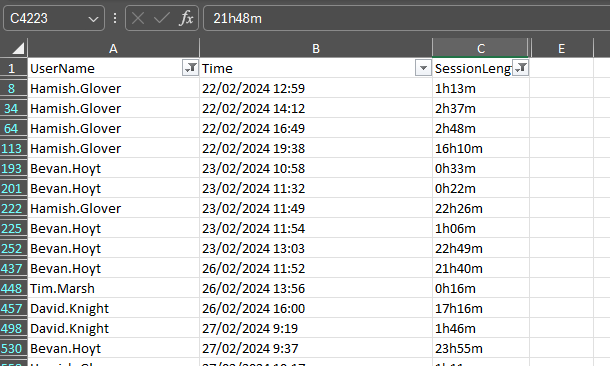
Export to CSV: Finally, it exports the collected login information to a CSV file named 'LoginInfo.csv' without including type information.
In summary, this script is a utility to collect and analyze user login and logoff events from the Windows Security log and export them to a CSV file for further analysis or reporting.
Preview of output (fiiltered)
# Function to convert ticks to a readable time format (hours and minutes)
function Convert-TicksToTime {
    param(
        [Parameter(Mandatory=$true)]
        [long]$Ticks
    )
    return [TimeSpan]::FromTicks($Ticks).ToString('h\hmm\m')
}

# Get all login events
$loginEvents = Get-WinEvent -FilterHashtable @{
    LogName='Security';
    ID=4624, 4625; # Logon and logoff event IDs
} -ErrorAction SilentlyContinue | Sort-Object TimeCreated

# Array to store login information
$logins = @()

foreach ($event in $loginEvents) {
    $eventXML = [xml]$event.ToXml()

    $properties = @{
        'Time' = $event.TimeCreated
        'EventID' = $event.Id
        'UserName' = $event.Properties[5].Value
        'SessionLength' = ''
    }

    # If it's a logoff event, calculate session length
    if ($event.Id -eq 4624) {
        $logoffEvent = $loginEvents | Where-Object { $_.Properties[5].Value -eq $properties['UserName'] -and $_.TimeCreated -gt $event.TimeCreated } | Select-Object -First 1
        if ($logoffEvent) {
            $properties['SessionLength'] = Convert-TicksToTime ($logoffEvent.TimeCreated - $event.TimeCreated).Ticks
        }
    }

    $logins += New-Object PSObject -Property $properties
}

# Export to CSV
$logins | Export-Csv -Path 'LoginInfo.csv' -NoTypeInformation